SHARE Knowledge Hub
Workstation Wellbeing
Workstation wellbeing starts with the task, the person and the work pattern. Assess regular display screen use under the applicable GB or Northern Ireland route, then change equipment, reach, posture demands and recovery opportunities when work causes discomfort. A checklist does not diagnose a condition or prove that the adjustment works.
Understanding Workstation Wellbeing
Workstation wellbeing is the sustainable fit between a person's work, equipment, environment, movement, visual demands and recovery. For display screen equipment (DSE), the employer must identify users, assess their workstations, reduce risks, plan breaks or changes of activity, provide training and information, and arrange eye tests on request. This is not achieved by a poster about posture or a one-off purchase of a chair.
Why this matters at work
Screen use can be visually demanding and may be associated with tired eyes, discomfort, headaches and temporary visual effects; HSE does not say DSE causes permanent eye damage. Check glare, reflections, screen readability, font size, viewing distance and the work routine. An eye test by the appropriate professional may identify a prescription need.
Provide a clear request route without requiring symptoms first. Tell users how tests are arranged and what costs are covered, and follow clinical advice on the required screen prescription. DSE use can reveal existing vision problems; HSE does not say it causes permanent eye damage.
How organisations manage this in practice
Control-room staff may monitor multiple screens for extended periods, sometimes at night. Assess visibility, seating, reach, alarms, display hierarchy, lighting transitions and the cognitive workload of vigilance. A generic single-monitor office checklist will miss many of these demands.
Arrange cover for real breaks and changes of activity without weakening operational monitoring. Test layouts under day and night conditions and involve operators in alarm and software design. Where errors could have serious consequences, examine fatigue and staffing as system risks rather than blaming posture or individual resilience.
Review after software, equipment, building, staffing, workload or location changes and after a symptom cluster. Audit whether breaks are genuinely possible, adjustments remain available and actions have been verified with users. Consult workers and set a named owner for recurring issues.
A chair, screen or wrist rest alone cannot compensate for excessive screen workload, inaccessible software or deadlines that prevent breaks. The system includes procurement, task design, staffing, software, lighting, noise, control over pace, training and a route to report discomfort. Workers should help test controls; leaders must make the changed way of working feasible.
Repair failed controls, organise equipment availability and consider designated arrangements where necessary. Review with users during actual work, including people with disabilities or symptoms, without requiring public health disclosure. Record defects and actions and make it clear how to report problems. Check that sharing does not create missing cables, unstable screen risers or crowded surfaces. Keep the assessment current after layout or equipment changes. Training helps workers use an adjustable setup, but it cannot compensate for a chair that will not adjust or a screen that cannot be positioned for the task.
Design for the conversation and the screen
A reception desk differs from a control room or home office. Fit layout and work routine to actual users and tasks rather than prescribing one perfect pose.
Observe both tasks
Review turning between visitor, display and inputs, alongside access, privacy and communication needs.
Adjust layout with users
Trial readable screen position, usable inputs, leg space and access without a universal angle or an assumption that posture causes tissue damage.
Make activity change possible
Arrange competent cover and workload so breaks and task changes are practical, including hybrid setups.
Close with real evidence
Retain the changed layout, owner and review, actual break access and user feedback. A completed checklist or list of factors alone does not prove improvement.
Read the complete task-specific control examples
ERICPD is a planning cross-map: Discipline verifies and sustains every control. ESEAP compares effectiveness. A label does not authorise the task; retain the owner, evidence and stop or change decision.
Workstation Wellbeing · ERICPD
- Eliminate
- Remove unnecessary duplicate data entry or a repeated manual copying step through a checked workflow redesign.
- Reduce
- Trial a suitable alternative input device or voice input for the real software, accuracy needs and user.
- Isolate
- Arrange the display, input devices, chair and work surface so the user can work without sustained twisting or excessive reach.
- Control
- Plan screen work to include breaks or changes of activity, with a call or meeting schedule that permits them.
- PPE
- Do not present a support wearable or protective equipment as removing static posture, repetition or an unsuitable work pattern.
- Discipline
- Maintain adjustment mechanisms and input equipment, close actions with the user, and reassess after a workstation, task, software, location or individual need changes.
Workstation Wellbeing · ESEAP
- Elimination
- Remove unnecessary duplicate data entry or a repeated manual copying step through a checked workflow redesign.
- Substitution
- Trial a suitable alternative input device or voice input for the real software, accuracy needs and user.
- Engineering controls
- Arrange the display, input devices, chair and work surface so the user can work without sustained twisting or excessive reach.
- Administrative controls
- Plan screen work to include breaks or changes of activity, with a call or meeting schedule that permits them.
- PPE
- Do not present a support wearable or protective equipment as removing static posture, repetition or an unsuitable work pattern.
What is workstation wellbeing?
Workstation wellbeing is the practical management of comfort, movement, equipment, environment and work routine around desk, screen and seated work.
Best-practice guide: Workstation Wellbeing
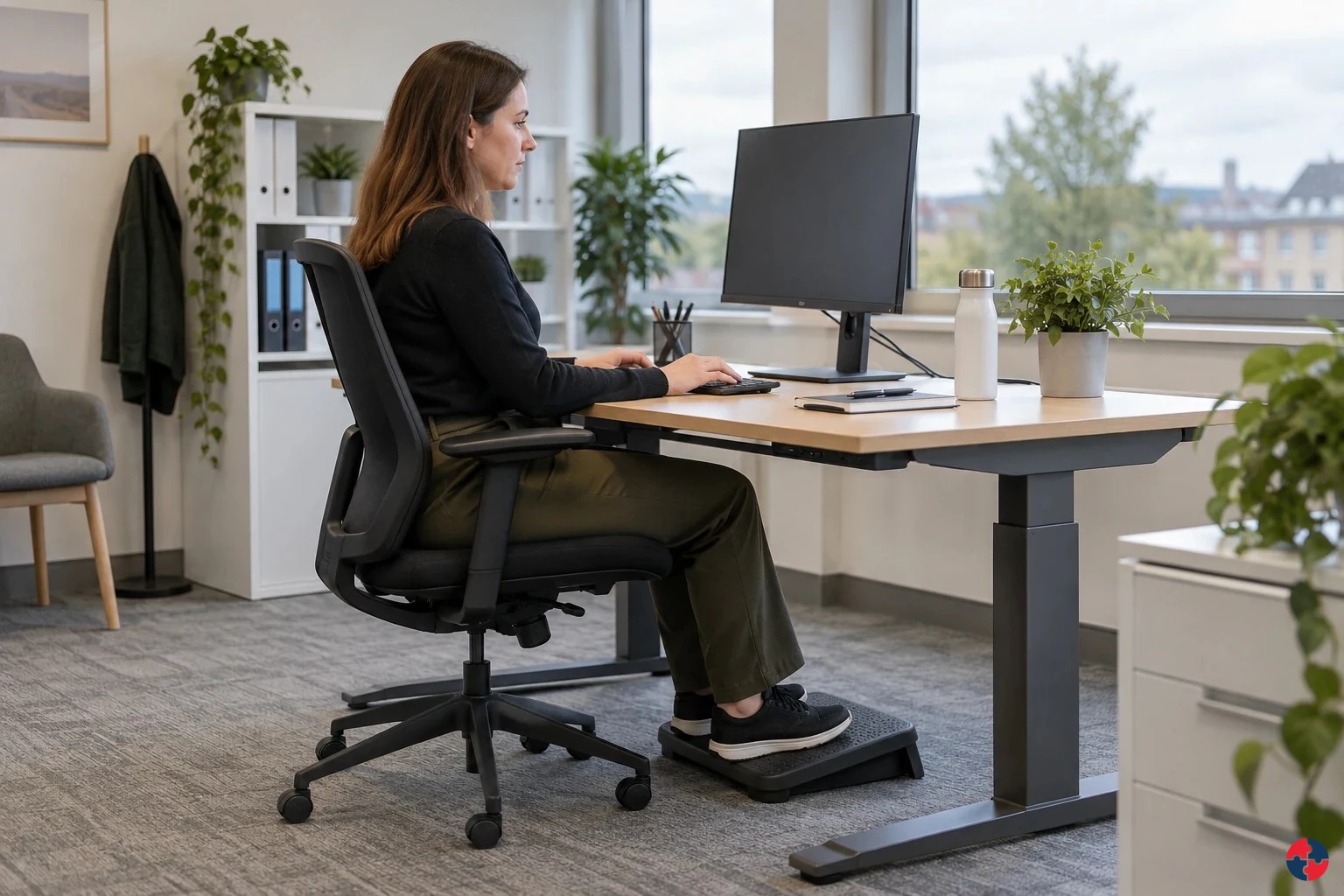
What is workstation wellbeing?
Workstation wellbeing is the practical management of comfort, movement, equipment, environment and work routine around desk, screen and seated work. Workstation wellbeing starts with the task, the person and the work pattern.
Turn workstation wellbeing knowledge into a decision
Workstation wellbeing starts with the task, the person and the work pattern. Assess regular display screen use under the applicable GB or Northern Ireland route, then change equipment, reach, posture demands and recovery opportunities when work causes discomfort. Work routine, headset fit, breaks and emotional load.
role examples practical decisions
Call centre: Work routine, headset fit, breaks and emotional load. Control room: Console design, task rotation and fatigue controls.
How does the work lead to harm? decision table
Static screen task: Neck, shoulder or back discomfort and fatigue can develop as activity stays fixed. Repeated hand use: Force and frequency may contribute to upper-limb symptoms. Home or mobile setup: Limited adjustability, glare or cramped work can increase discomfort.
Choose controls for the actual task
Eliminate: Remove unnecessary duplicate data entry or a repeated manual copying step through a checked workflow redesign. Reduce, including substitution: Trial a suitable alternative input device or voice input for the real software, accuracy needs and user. Isolate: Arrange the display, input devices, chair and work surface so the user can work without sustained twisting or excessive reach. Control: Plan screen work to include breaks or changes of activity, with a call or meeting schedule that permits them. PPE: No PPE solution to ordinary workstation loading Read the full control table for qualifications, ownership and verification. Use the actual task and applicable jurisdiction; existing technical approval remains unchanged.
Use the full workstation wellbeing lesson
Use the full topic for the decision points, practical examples, detailed control tables and source scope. HSE guidance applies to Great Britain; use HSENI for the Northern Ireland route and the source’s stated jurisdiction. A simplified guide does not change the page’s technical-review or approval status.

Read all six steps as text
1. What is workstation wellbeing?
Workstation wellbeing is the practical management of comfort, movement, equipment, environment and work routine around desk, screen and seated work.
- Avoid / redesign: Remove unnecessary duplicate data entry or a repeated manual copying step through a checked workflow redesign.
- Control the task: Arrange the display, input devices, chair and work surface so the user can work without sustained twisting or excessive reach.
- Verify before release: Process owner checks task completion, remaining input time and user feedback.
Workstation wellbeing is the practical management of comfort, movement, equipment, environment and work routine around desk, screen and seated work. Workstation wellbeing starts with the task, the person and the work pattern.
Apply it: Which part of this plan would you check at the workface before authorising the task?
2. Turn workstation wellbeing knowledge into a decision
Use the evidence to improve the actual work arrangement.
- Change at source: Fit the layout and work routine to the actual user and task.
- Make it observable: Assign a layout or cover change, owner and due date; check actual access to activity changes and breaks.
- Keep useful evidence: Retain the changed arrangement, user response, unresolved issues and later verification rather than a factor list alone.
Workstation wellbeing starts with the task, the person and the work pattern. Assess regular display screen use under the applicable GB or Northern Ireland route, then change equipment, reach, posture demands and recovery opportunities when work causes discomfort. Work routine, headset fit, breaks and emotional load.
Apply it: What evidence would show that the change improves this task, rather than only completing a record?
3. role examples practical decisions
Example: a practical application of the existing topic lesson.
- Call centre: Work routine, headset fit, breaks and emotional load.
- Control room: Console design, task rotation and fatigue controls.
- Reception: Screen/desk layout and seating position.
Call centre: Work routine, headset fit, breaks and emotional load. Control room: Console design, task rotation and fatigue controls.
Apply it: At which point would you hold this example, and what evidence would allow it to proceed?
4. How does the work lead to harm? decision table
Connect the task, the route to the person and the control that can fail.
- Static screen task: Neck, shoulder or back discomfort and fatigue can develop as activity stays fixed.
- Repeated hand use: Force and frequency may contribute to upper-limb symptoms.
- Home or mobile setup: Limited adjustability, glare or cramped work can increase discomfort.
Static screen task: Neck, shoulder or back discomfort and fatigue can develop as activity stays fixed. Repeated hand use: Force and frequency may contribute to upper-limb symptoms. Home or mobile setup: Limited adjustability, glare or cramped work can increase discomfort.
Apply it: Who could be exposed, including other trades, cleaners, maintainers and people nearby?
5. Choose controls for the actual task
Control summary. Read the complete task-specific controls and checks in the linked topic.
- Elimination: Remove unnecessary duplicate data entry or a repeated manual copying step through a checked workflow redesign.
- Substitution: Trial a suitable alternative input device or voice input for the real software, accuracy needs and user.
- Engineering controls: Arrange the display, input devices, chair and work surface so the user can work without sustained twisting or excessive reach.
- Administrative controls: Plan screen work to include breaks or changes of activity, with a call or meeting schedule that permits them.
- PPE: Do not present a support wearable or protective equipment as removing static posture, repetition or an unsuitable work pattern.
Eliminate: Remove unnecessary duplicate data entry or a repeated manual copying step through a checked workflow redesign. Reduce, including substitution: Trial a suitable alternative input device or voice input for the real software, accuracy needs and user. Isolate: Arrange the display, input devices, chair and work surface so the user can work without sustained twisting or excessive reach. Control: Plan screen work to include breaks or changes of activity, with a call or meeting schedule that permits them. PPE: No PPE solution to ordinary workstation loading Read the full control table for qualifications, ownership and verification. Use the actual task and applicable jurisdiction; existing technical approval remains unchanged.
Apply it: Which stronger option can be used here, and who will verify it before accepting the remaining risk?
6. Use the full workstation wellbeing lesson
Follow the official sources below and retain the task-specific evidence.
- Official guidance: Use the linked current HSE DSE guidance for the actual user and work pattern.
- Task decision: Record layout and routine changes, owner, review and user feedback, including actual access to breaks.
- Boundary: A checklist or normal anatomy view cannot diagnose injury or establish that all tasks are controlled.
Use the full topic for the decision points, practical examples, detailed control tables and source scope. HSE guidance applies to Great Britain; use HSENI for the Northern Ireland route and the source’s stated jurisdiction. A simplified guide does not change the page’s technical-review or approval status.
Apply it: Which official source and full-topic section will you use to resolve the next decision?
HSE means the Health and Safety Executive for Great Britain; HSENI means the Health and Safety Executive for Northern Ireland. HR means human resources. Occupational health (OH) provides competent work-health advice; the United Kingdom General Data Protection Regulation (UK GDPR) governs personal-data handling. The employer owns the work controls, with clinical and privacy decisions assigned to competent people.
Workstation wellbeing connects physical comfort and function with the design of the task, equipment, work pattern and support route. Prolonged static posture, repeated movement, force, awkward reach and insufficient recovery can contribute to discomfort and reduced function; a diagnosis cannot be inferred from a workstation checklist. For regular display screen users, apply the distinct display screen equipment (DSE) assessment and eye-test duties. For everyone, listen to symptoms early, adjust the work and refer health questions to a competent clinical route.
Formal DSE assessment remains important where the DSE regulations apply. Workstation wellbeing sits alongside it by asking whether the setup and work routine remain comfortable, sustainable and inclusive in real use. A perfect checklist does not help if the worker sits in long uninterrupted calls, uses a laptop on a sofa for months, cannot report discomfort, or is expected to be visibly online without breaks.
The strongest approach is early and practical: assess the setup, adjust the work routine, improve equipment where needed, support individual needs and review discomfort before it becomes absence or a long-term musculoskeletal problem.
| Area | What to consider | Good practice |
|---|---|---|
| Equipment | Screen, keyboard, mouse, chair, desk, headset and laptop use. | Suitable equipment matched to user and task. |
| Posture and movement | Static loading, reach, twisting, neck position and recovery. | Workstation setup plus regular change of activity. |
| Work routine | Meetings, calls, keyboard intensity, breaks and task variety. | Breaks or changes of activity planned into the work. |
| Environment | Lighting, glare, temperature, noise, space and ventilation. | Comfortable conditions and prompt issue resolution. |
| Hybrid/home working | Multiple work locations and equipment consistency. | Assessment covers home and office where relevant. |
| Individual needs | Disability, pregnancy, injury, pain, eyesight, neurodiversity and adjustments. | Private, proportionate support and review. |
How does the work lead to harm?
Long static sitting, repeated clicks or keystrokes, high force, awkward reach and too little recovery can contribute to pain, fatigue or loss of function. Poor screen positioning or lighting can add eye strain; a poorly designed task may also concentrate cognitive load. Symptoms have many possible causes, so review the job and setup without diagnosing the person. Act when discomfort, tingling, reduced grip or functional difficulty appears.
Identify the source, route to the person, early signal, strongest practicable control and stop decision. Test that decision in real work and after change.
| Exposure | Harm route | Control and hold point |
|---|---|---|
| Static screen task | Neck, shoulder or back discomfort and fatigue can develop as activity stays fixed. | Change task and movement pattern; adjust screen, chair and reach. |
| Repeated hand use | Force and frequency may contribute to upper-limb symptoms. | Redesign input device, workload, pace and recovery; escalate persistent symptoms. |
| Home or mobile setup | Limited adjustability, glare or cramped work can increase discomfort. | Assess the actual setting and provide a workable alternative. |
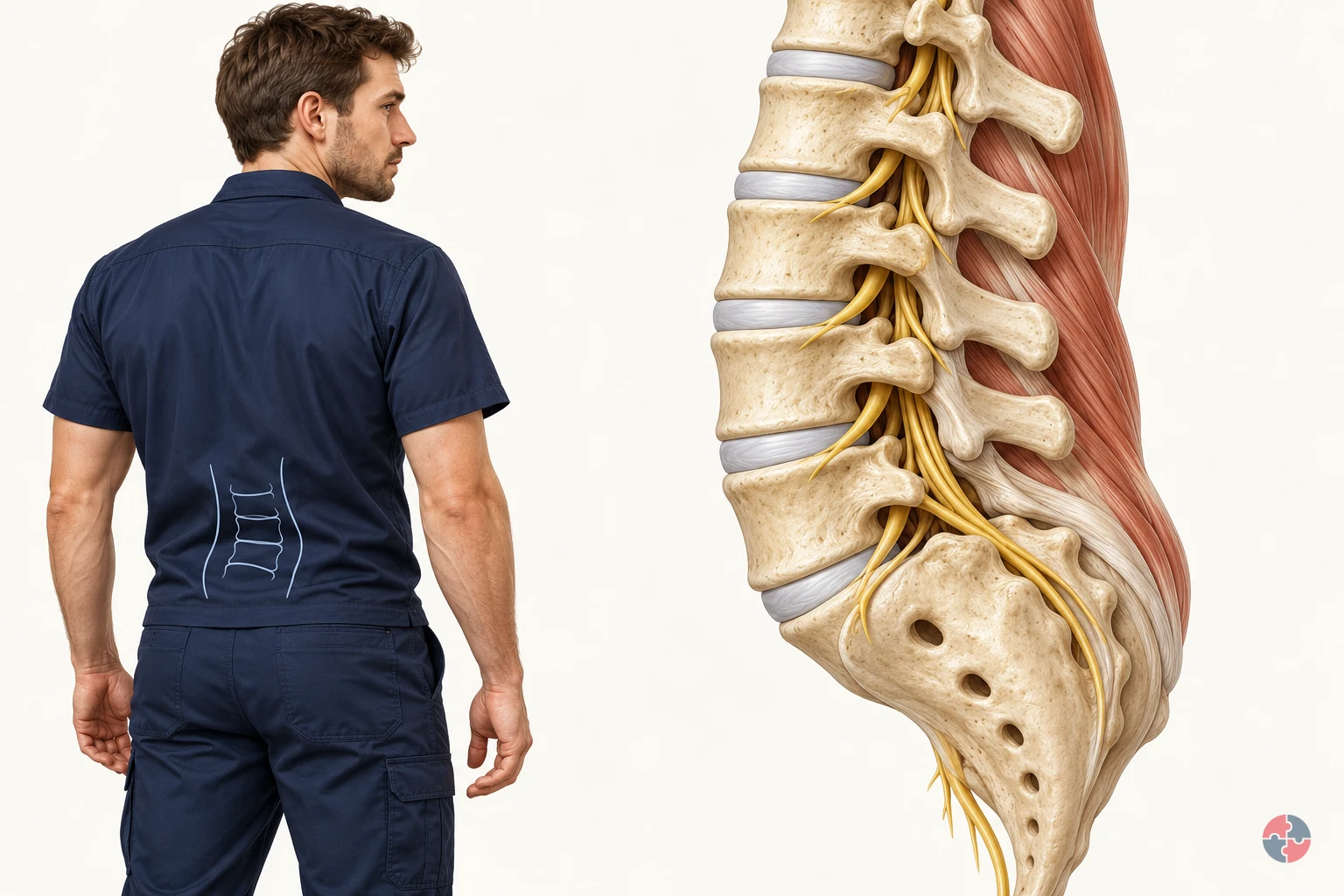

How does the back support movement, and how can work design reduce manual handling risk?
Interactive anatomy · Back and manual handling · Updated 2026-10-23
Read all anatomy and process explanations without the viewer
Simplified education, not a scan interpretation, diagnosis, safe-weight calculator, posture score or personalised exercise prescription. No webcam, posture capture or personal symptom input. Task demand comparisons never alter disc morphology or calculate spinal compression, tissue tolerance or injury probability.
Vertebral body
A vertebra is one of the bones of the spine. The vertebral body is the substantial front portion of a spinal bone. Neighbouring bodies are linked through discs, while other bony parts help enclose the nerve space behind them. Follow the bone-and-disc pattern to see how a spinal segment combines support with movement rather than behaving as a pile of separate blocks. University Hospitals Birmingham NHS Foundation Trust: Lumbar decompressive surgery: structure of the spine · DynamicHealth · NHS: Lower back pain
Intervertebral disc
A disc lies between neighbouring vertebral bodies. A disc is flexible tissue joining neighbouring vertebral bodies. A tougher outer region surrounds a softer centre, and the connected structure helps accommodate loading and movement. In the healthy model it stays part of the segment. The closer cutaway explains its regions; it is not a pressure gauge or a prediction of what a lift will do. University Hospitals Birmingham NHS Foundation Trust: Lumbar decompressive surgery: structure of the spine · DynamicHealth · NHS: Lower back pain
Outer disc region
The tougher outer region surrounds the softer centre. This labelled cross-section simplifies the disc’s tissue organisation. A ring outline is a teaching aid, not a measure of tissue strength. University Hospitals Birmingham NHS Foundation Trust: Lumbar decompressive surgery: structure of the spine
Inner disc region
The softer centre works with the outer disc tissue. Both regions contribute during loading. The diagram does not behave as a water balloon or show a pressure gauge. University Hospitals Birmingham NHS Foundation Trust: Lumbar decompressive surgery: structure of the spine
Facet joint
Small paired joints link neighbouring vertebrae. They contribute to stability and help guide movement at the back of the spine. Partner surfaces remain together during the normal movement example. The Dudley Group NHS Foundation Trust: Facet joint injections and medial branch block
Ligament
A ligament connects bones. Spinal ligaments help guide and restrain movement. They are a different tissue connection from a tendon. NHS: Sprains and strains · University Hospitals Birmingham NHS Foundation Trust: Lumbar decompressive surgery: structure of the spine
Supporting muscle
Back and trunk muscles help produce and control movement. Muscle fibres generate force and change length as they produce or control movement. Their pull is transmitted through tendon attachments to bone. Back, trunk and hip muscles contribute together during everyday bending and reaching. The highlighted muscle simplifies one part of that system, allowing you to follow a connection rather than calculate the effort of every muscle. DynamicHealth · NHS: Lower back pain · NHS: Tendonitis · York and Scarborough Teaching Hospitals NHS Foundation Trust: Treating a soft tissue injury: normal soft-tissue roles
Tendon attachment
A tendon transmits a muscle’s pull to bone. A tendon provides the connection through which muscle pull reaches bone. Trace it from the muscle into the attachment, then compare it with a ligament, which connects bones. The two connections contribute different functions. Keeping the attachment visible helps explain how a muscle can move or steady a joint without the tendon becoming a separate loose cord. NHS: Tendonitis · DynamicHealth · NHS: Lower back pain
Nerve root
Nerve roots leave the canal through side openings. A nerve root passes out beside the spinal bones towards the areas it supplies. Pressure or nearby inflammation can irritate it, sometimes producing symptoms in the buttock, leg or foot. The highlighted pathway explains this possible relationship, but symptoms vary. A coloured region cannot identify the cause of somebody’s pain or establish that a particular disc is responsible. University Hospitals Birmingham NHS Foundation Trust: Lumbar decompressive surgery: structure of the spine · NHS: Slipped disc · NHS: Sciatica · Norfolk & Waveney Community Musculoskeletal Services · NHS: Sciatica: understanding nerve irritation and protective muscle activity · Bradford Teaching Hospitals NHS Foundation Trust: Pain management: nerve root pain
Lower spinal canal
The lower lumbar canal contains a bundle of nerve roots. Below the end of the spinal cord these roots continue as the cauda equina. A solid spinal cord should not extend through this lower-lumbar illustration. University Hospitals Birmingham NHS Foundation Trust: Lumbar decompressive surgery: structure of the spine
Open the complete process transcript
The process, step by step
1 · Share support
Each vertebra works with the discs and other tissues around it to support the trunk while allowing movement. The disc between two vertebral bodies is flexible tissue, with a tougher outer region surrounding a softer centre. It helps the connected segment accommodate loading; it is not a loose pad that normally slides out when someone bends. Follow the repeating bone-and-disc arrangement, then look behind it towards the joints and nerve space. This relationship explains how support, movement and protection can coexist in the same part of the back. University Hospitals Birmingham NHS Foundation Trust: Lumbar decompressive surgery: structure of the spine · DynamicHealth · NHS: Lower back pain
What to watch: Follow two neighbouring vertebral bodies, the disc between them and the protected nerve space behind the bones in the lumbar view.
Why it matters: Support is shared across connected tissues rather than supplied by a single bone or disc. This arrangement allows the back to bear everyday demands while retaining the flexibility needed to change position.
Explore this step: Pause the model and locate the disc between two bones before selecting the next step.
2 · Allow movement
Movement of the back is spread across connected spinal segments and the rest of the body. The paired facet joints at the back of neighbouring vertebrae help guide movement, while ligaments connect bones and contribute to stability. In this step, the small illustrative movement helps you locate these relationships; it does not show a strain or a ligament being torn. Ordinary bending is part of normal function. Notice how a joint and a ligament perform different jobs, and avoid interpreting one demonstrated position as a universal safe or unsafe posture. University Hospitals Birmingham NHS Foundation Trust: Lumbar decompressive surgery: structure of the spine · The Dudley Group NHS Foundation Trust: Facet joint injections and medial branch block · Cambridge University Hospitals NHS Foundation Trust: Myth busting about posture, core stability and lifting
What to watch: Look behind the vertebral bodies for the paired facet joints, then follow the ligament between its bony attachment points.
Why it matters: Joints permit and guide movement; ligaments contribute restraint and stability. Together with the other spinal tissues, they allow controlled movement without making the back a rigid column or ordinary bending an injury.
Explore this step: Compare the joint and ligament labels and describe the different connection each one makes.
3 · Produce and control force
Muscle fibres produce force and can shorten or lengthen as they move or control the body. Their pull reaches bone through tendon attachments. Follow that continuous connection from the larger muscle region into the narrower tendon and its attachment, rather than treating muscle, tendon and bone as separate objects. Back, trunk and hip muscles contribute together during bending, turning and reaching. The model simplifies one part of this system so that the connection is easier to follow. Its movement is an explanation of function, not a measurement of an individual muscle’s effort or strength. DynamicHealth · NHS: Lower back pain · NHS: Tendonitis · York and Scarborough Teaching Hospitals NHS Foundation Trust: Treating a soft tissue injury: normal soft-tissue roles
What to watch: Follow the supporting muscle into its tendon and then to the bone, using the close view to keep the attachment visible.
Why it matters: This continuous attachment allows a muscle’s pull to move or steady the skeleton. Controlling a movement can involve muscle work as well as starting it; the visible motion does not account for every contributing muscle.
Explore this step: Trace the connection in both directions, then explain how a tendon differs from a ligament.
4 · Review the task
Normal back function takes place within a whole task, not an isolated spinal joint. Use the task view to compare a nearer reach with a more distant one. The load, how often it is handled, the working height, available space and the person’s capability all matter when assessing unavoidable handling. Repeated work is a separate factor from the reach shown in one still position. This comparison directs attention to work design; it does not calculate spinal force, identify a tissue injury or establish a safe load for everyone. HSE: Back pain at work · HSE: Assess manual handling you cannot avoid
What to watch: Compare the position of the person and the load in the closer and farther reach, including the surrounding working space.
Why it matters: The same body may face different demands when the task layout changes. Looking at reach alongside load, frequency, space and capability helps explain why an anatomy view alone cannot establish whether handling is suitable.
Explore this step: Compare both arrangements and name one task factor the model cannot measure for your workplace.
5 · Compare an example
Use the healthy segment as a reference before exploring an independent tissue example. A muscle strain concerns muscle tissue, a sprain concerns a ligament, and a disc example concerns a different structure again. These are separate explanations, not consecutive stages that every back passes through during a lift. Back pain can have several contributors, and the location or intensity of pain does not identify a damaged tissue by itself. Keep the normal view available so you can compare the selected structure without assuming that a pictured mechanism diagnoses a person or predicts what a task will do. NHS: Sprains and strains · NHS: Slipped disc · NHS: Back pain
What to watch: Locate the muscle, ligament, disc and nearby nerve root in the healthy reference before opening any separate tissue example.
Why it matters: Separating the tissues prevents a misleading story in which normal movement automatically becomes a specific injury. A model can explain a possible mechanism while leaving an individual’s symptoms and cause to proper assessment.
Explore this step: Choose one tissue example, identify the structure involved, and return to the healthy reference for comparison.
Worked handling examples
Bending to lower a load
A worker lowers a held box towards a low receiving surface. The low destination and repeated handling make the arrangement worth reviewing.
Check the receiving height, reach, grip, load and number of moves, including whether a handling aid can remove the repeated low placement.
Inspect the low destination The box starts in the worker’s hands, with a low receiving point ahead. Notice the standing space, the handhold and the distance to the destination. HSE: Assess manual handling you cannot avoid
Bend and lower the box The worker bends forwards and lowers the box. Watch the trunk and hips move together while supporting muscles control the descent. Muscle fibres change length and transmit pull through their tendon attachments. HSE: Back pain at work · NHS: Tendonitis · Cambridge University Hospitals NHS Foundation Trust: Myth busting about posture, core stability and lifting · York and Scarborough Teaching Hospitals NHS Foundation Trust: Treating a soft tissue injury: normal soft-tissue roles
Inspect the supporting muscles Follow the muscle fibres into their tendon attachments. Fibres change length while producing or controlling movement; the tendons transmit their pull to bone. Use Spine and attachments to locate these connections around the lumbar segment. NHS: Sprains and strains · NHS: Tendonitis · Cambridge University Hospitals NHS Foundation Trust: Myth busting about posture, core stability and lifting · York and Scarborough Teaching Hospitals NHS Foundation Trust: Treating a soft tissue injury: normal soft-tissue roles
Raise the receiving point and reduce handling Compare a receiving point closer to a practical working height. Before relying on a handling instruction, consider a suitable lift table, a different delivery arrangement or removing the handling step. HSE: Manual handling at work · HSE: Manual handling: reduce the risk of injury
Compare raised placement Provide a suitable raised receiving surface within easy access, and check whether a handling aid or process change can remove the repeated low placement. Confirm that the revised arrangement works with the team. HSE: Manual handling at work · HSE: Assess manual handling you cannot avoid · HSE: Manual handling: reduce the risk of injury
Ordinary bending is part of normal movement. This composite task does not identify a pain source, assign a safe posture or predict injury.
Turning while holding a load
A worker transfers a box to a surface at the side. The original layout invites a turn through the trunk while the feet remain facing the first surface.
Review transfer direction, foot space, the load and the pace of work so people have room to reposition while controlling the box.
Spot the sideways destination The destination is offset from the starting position. Before moving, check that the turning route is clear and the load will not hide obstacles. HSE: Assess manual handling you cannot avoid · HSE: Manual handling: good handling technique
Watch the loaded turn Compare the feet, pelvis and shoulders as the worker turns with the box. Supporting muscles change their pull to control the turn, while ligaments guide and restrain movement between neighbouring bones. HSE: Back pain at work · University Hospitals Birmingham NHS Foundation Trust: Lumbar decompressive surgery: structure of the spine · HSE: Manual handling: good handling technique · York and Scarborough Teaching Hospitals NHS Foundation Trust: Treating a soft tissue injury: normal soft-tissue roles
Inspect the ligament connection Open Ligament close-up to identify the bone-to-bone connection. Use Spine and joints to see how neighbouring structures support and guide normal movement. NHS: Sprains and strains · University Hospitals Birmingham NHS Foundation Trust: Lumbar decompressive surgery: structure of the spine
Make room to turn with the load Compare a clearer transfer arrangement that lets the worker reposition the feet towards the destination. Review the layout first; a turning instruction cannot create missing floor space. HSE: Manual handling: good handling technique · HSE: Manual handling: reduce the risk of injury
Compare repositioned turn Clear the turning area and bring the receiving position into a better alignment. Where a turn remains, provide space to move the feet with the load; consider a suitable transfer aid for repeated moves. HSE: Manual handling: good handling technique · HSE: Manual handling: reduce the risk of injury
This is a selected work example and a separate possible sprain illustration. The model cannot decide whether a particular turn is harmful or diagnose symptoms.
Reaching to place a load
A worker places a box towards the back of a shelf. The shelf depth keeps the load away from the body during the final part of the placement.
Check shelf depth, placement height, access from the other side, grip and repetition instead of assessing the box by weight alone.
Identify the placement point The destination is set behind the accessible shelf edge. Notice the space in front of the shelf and the reach needed while the box is still supported by the hands. HSE: Assess manual handling you cannot avoid
Watch the load move away The box moves farther from the body as the worker reaches. Watch the trunk and arms extend while the supporting muscles control the load. The longer reach changes the task demand; the model does not calculate tissue force. HSE: Back pain at work · HSE: Assess manual handling you cannot avoid · HSE: Manual handling: good handling technique
Inspect muscle fibres and the spine Inspect the muscle fibres as they change length and pull through their tendon attachments. Use Spine and attachments to see how these tissues connect around the lumbar segment. NHS: Sprains and strains · NHS: Tendonitis · NHS: Sciatica · York and Scarborough Teaching Hospitals NHS Foundation Trust: Treating a soft tissue injury: normal soft-tissue roles
Bring the receiving point within reach Compare a receiving point closer to the shelf edge. Consider changing the shelf or access, using a suitable aid, and setting the load down before making small position adjustments. HSE: Manual handling: good handling technique · HSE: Manual handling: reduce the risk of injury
Compare closer placement Move the receiving point nearer or redesign access so a long unsupported placement is unnecessary. Check suitable aids for the actual load and consider putting it down before the final position adjustment. HSE: Manual handling: good handling technique · HSE: Manual handling: reduce the risk of injury
Reach and load position are task factors, not a diagnosis. The colour and fibre motion identify a teaching region, rather than a measured injury from this placement.
Read the practice situations and all answer explanations
Sources and how the model is made
The opening images are AI-generated anatomical illustrations. The interactive 3D models and labelled SVG diagrams use original procedural artwork. These teaching images are not medical scans or diagnostic tools. Source references support the learner explanations and do not grant artwork rights.
- HSE: Manual handling at work — Avoid hazardous handling where practicable, assess unavoidable tasks and reduce risk; there is no universal weight limit.
- HSE: Back pain at work — Work design, repetition/reach, handling aids, consultation and early reporting.
- NHS: Sprains and strains — Muscle strain versus ligament sprain, local pain/tenderness and possible involuntary painful muscle tightening (spasm); no treatment programme copied.
- NHS: Slipped disc — Outward disc protrusion, possible nerve involvement and absence of symptoms in some people; the animation is not a diagnosis.
- NHS: Back pain — Often uncertain cause, possible muscle spasm, routine versus urgent assessment and emergency warning signs.
- University Hospitals Birmingham NHS Foundation Trust: Lumbar decompressive surgery: structure of the spine — Basic vertebral/disc/ligament anatomy, nerve roots and cauda equina only. Source illustrations and surgery instructions are not copied.
- DynamicHealth · NHS: Lower back pain — Lumbar support, discs, ligaments, tendon attachments and varied movement context.
- The Dudley Group NHS Foundation Trust: Facet joint injections and medial branch block — Only the normal role of paired facet joints in stability and guiding movement; no injection advice.
- NHS: Tendonitis — Tendons connect muscle to bone; no medication or treatment prescription reused.
- HSE: Manual handling: training — Training supports work design and does not ensure safe handling on its own.
- HSE: Assess manual handling you cannot avoid — Assessment of task, load, frequency, working environment and individual capability.
- Cambridge University Hospitals NHS Foundation Trust: Myth busting about posture, core stability and lifting — Avoid fear-based posture claims and a single ideal posture; no personalised exercise advice.
- NHS: Sciatica — Nerve irritation/compression, possible symptoms in the buttock and one leg or foot, variable symptom onset, when to obtain advice and emergency warning signs. No treatment programme or diagnostic distribution is copied.
- Norfolk & Waveney Community Musculoskeletal Services · NHS: Sciatica: understanding nerve irritation and protective muscle activity — Pressure and local inflammation as possible routes to nerve irritation; protective muscle activity and possible cramp; connected discs do not slip out as loose objects. No copied artwork, exercise or treatment programme.
- Bradford Teaching Hospitals NHS Foundation Trust: Pain management: nerve root pain — Disc bulges may irritate or compress nerve roots, with symptoms in supplied leg/foot regions. Only explanatory anatomy and symptom context, not clinical management or a diagnostic nerve map.
- HSE: Manual handling: good handling technique — Practical planning, load position, foot movement during turning, and setting down before final adjustment. Technique supports task redesign and suitable aids; no universal posture or safe load is inferred.
- HSE: Manual handling: reduce the risk of injury — Task-specific mechanical help and changes to load, height, layout, space and work routine for unavoidable handling. Original worked examples are not HSE-tested tasks.
- York and Scarborough Teaching Hospitals NHS Foundation Trust: Treating a soft tissue injury: normal soft-tissue roles — Basic anatomy only: muscle fibres contract and lengthen to produce or control movement, tendons connect muscle to bone, and ligaments connect bones. Paediatric treatment advice, recovery times and artwork are not reused.
- Bexley Musculoskeletal Service · NHS: Acute low back pain — Low-back pain may also be felt in the buttocks and thighs; pain intensity or location does not establish a specific tissue injury. No treatment programme, exercise, fixed recovery estimate or diagnostic rule is reused.
Power-zone explorer: what the colours mean
Choose Explore the 3D power zone in the handling examples. Move the load using the height, reach, side-position and mass controls. The floor target connects the feet to the load position; the translucent volume shows a close-in handling zone for this illustrative worker. Red highlights and matching text identify areas with added demand as the arrangement changes.
The display is a task-design illustration. It does not calculate tissue forces, identify damaged structures, predict pain or injury, or recommend a safe lifting weight. Actual handling needs assessment of the task, individual, load, environment and other factors, including repetition and recovery. Consider avoiding the handling or using suitable aids before relying on lifting technique.
HSE: good handling technique · HSE: control measures for lifting tasks
How can the hierarchy of controls reduce physical strain and harmful demands at workstations?
Remove the hazard where reasonably practicable. If it remains, consider a safer method, engineering controls and safe work arrangements before personal protective equipment for residual risk.
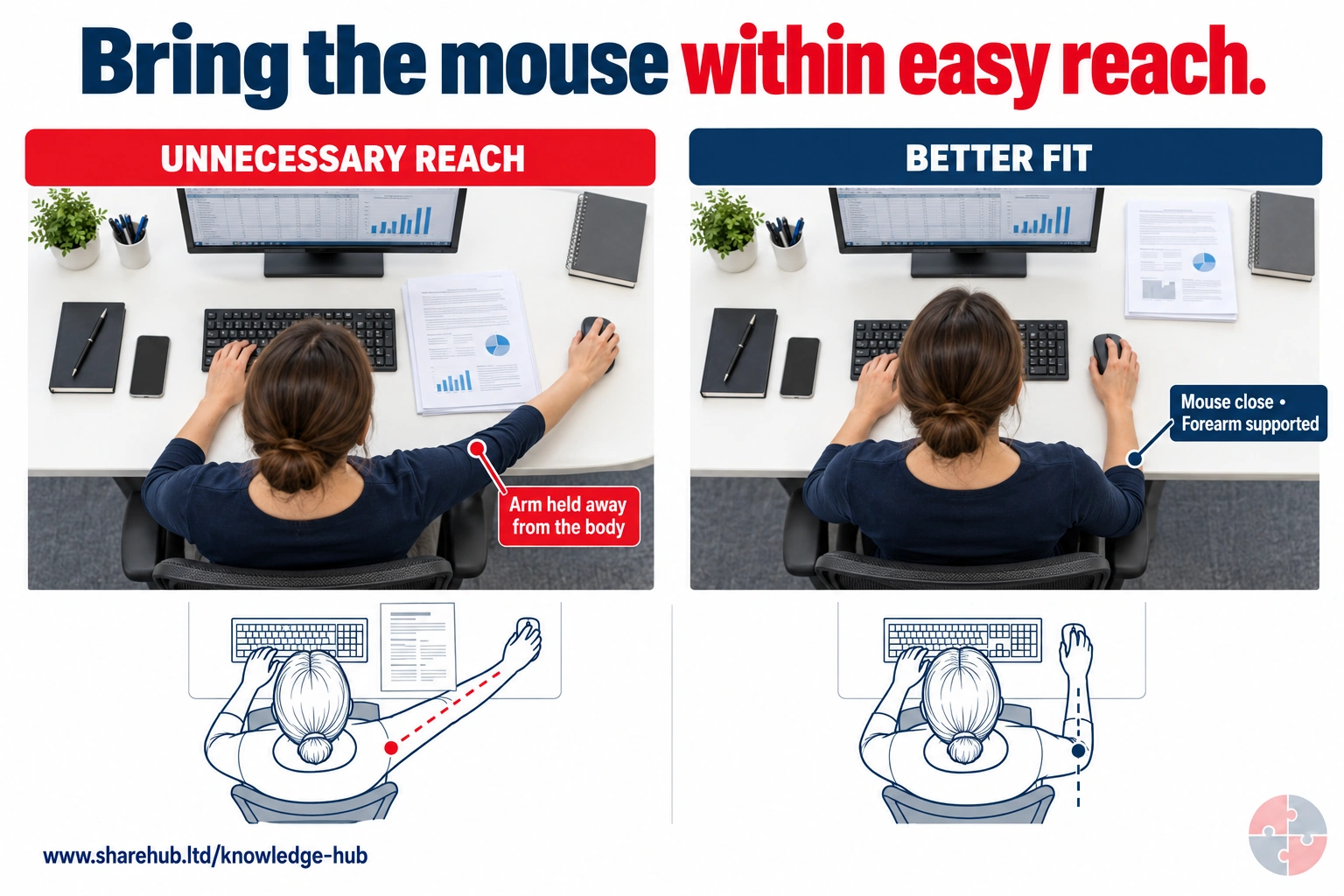

The same workstation is compared with the mouse beyond a document and beside the keyboard. The second arrangement reduces unnecessary reach and supports the forearm. Check the actual person's comfort and task demands.
What changed apart from the mouse position?
The document moved out of the input zone, allowing the elbow to stay closer to the body with forearm support.
Learning illustration; review against the full topic and source before use.
Source guidance: HSE L26
HSE places elimination, substitution, engineering, administrative controls and personal protective equipment in that order. Verify that the chosen controls work on the actual task.
ERICPD (Eliminate, Reduce including substitution, Isolate, Control, personal protective equipment (PPE), Discipline) is a SHARE decision prompt cross-mapped to HSE’s five-level hierarchy. For workstation risk, change the demand, equipment or task before relying on reminders. A headset, adjustable chair or altered schedule needs a trial with the actual user and work; no single posture or product proves that cumulative strain is controlled. Discipline means maintaining the setup and acting on feedback.
How can the ERICPD hierarchy of controls reduce physical strain and harmful demands at workstations?

| ERICPD prompt | HSE relation | Task-specific measure | Owner, verification and review point |
|---|---|---|---|
| Eliminate | Elimination | Remove unnecessary duplicate data entry or a repeated manual copying step through a checked workflow redesign. This removes the extra screen, input or reaching demand instead of asking the user to tolerate it. | Process owner checks task completion, remaining input time and user feedback. Reject a change that transfers the repetition or workload to another person or task. Basis: HSE Upper limb disorders; HSE DSE workstations and assessment |
| Reduce, including substitution | Substitution or safer method | Trial a suitable alternative input device or voice input for the real software, accuracy needs and user. Replace long laptop-only work with suitable separate input/display equipment where assessment identifies the need; check whether the change reduces force and awkward reach. | DSE assessor and equipment owner observe real work and check accuracy, posture, reach and discomfort after the trial. Stop using an unsuitable substitute and reassess if strain shifts to another body part. Basis: HSE DSE workstations and assessment; HSE Working with DSE at home |
| Isolate | Engineering and physical design | Arrange the display, input devices, chair and work surface so the user can work without sustained twisting or excessive reach. Control glare at source through position or suitable shading, and fit the setup to the actual user rather than prescribe a fixed posture. | Assessor and facilities owner verify adjustment ranges, support, display readability and reach in both home and office settings. Hold prolonged use of a setup that cannot accommodate the task or user until a workable arrangement is provided. Basis: HSE Good posture when using DSE; HSE DSE workstations and assessment |
| Control | Administrative and organisational controls | Plan screen work to include breaks or changes of activity, with a call or meeting schedule that permits them. Provide setup instruction, early discomfort reporting and a named owner for equipment and workload actions; task variation must genuinely change exposure. | Line manager checks actual opportunities for activity change and follows up worker feedback. Reassess when workload defeats the plan or symptoms persist; seek competent ergonomic or occupational-health advice for unresolved cases. Basis: HSE DSE work routine and breaks; HSE Upper limb disorders |
| PPE | No PPE solution to ordinary workstation loading | Do not present a support wearable or protective equipment as removing static posture, repetition or an unsuitable work pattern. The DSE eye-test and special-glasses duties have their own eligibility and purpose; glasses are not a substitute for suitable screen and task design. | Manager and assessor keep equipment, work routine and eye-test decisions separate. Reject a plan that relies on a wearable or glasses while the assessed workstation exposure remains unmanaged. Basis: HSE eye-test guidance; HSE DSE workstations and assessment |
| Discipline | Sustain all control levels | Maintain adjustment mechanisms and input equipment, close actions with the user, and reassess after a workstation, task, software, location or individual need changes. Record work controls and necessary functional advice with appropriate privacy. | Employer and line manager verify action completion and effectiveness with user feedback. Reopen the assessment when pain, equipment failure or workarounds recur; health records follow the competent privacy and clinical routes. Basis: HSE DSE workstations and assessment; UK GDPR |
How can the ISO 45001 hierarchy of controls reduce physical strain and harmful demands at workstations?

| ERICPD prompt | HSE relation | Task-specific measure | Owner, verification and review point |
|---|---|---|---|
| Eliminate | Elimination | Remove unnecessary duplicate data entry or a repeated manual copying step through a checked workflow redesign. This removes the extra screen, input or reaching demand instead of asking the user to tolerate it. | Process owner checks task completion, remaining input time and user feedback. Reject a change that transfers the repetition or workload to another person or task. Basis: HSE Upper limb disorders; HSE DSE workstations and assessment |
| Reduce, including substitution | Substitution or safer method | Trial a suitable alternative input device or voice input for the real software, accuracy needs and user. Replace long laptop-only work with suitable separate input/display equipment where assessment identifies the need; check whether the change reduces force and awkward reach. | DSE assessor and equipment owner observe real work and check accuracy, posture, reach and discomfort after the trial. Stop using an unsuitable substitute and reassess if strain shifts to another body part. Basis: HSE DSE workstations and assessment; HSE Working with DSE at home |
| Isolate | Engineering and physical design | Arrange the display, input devices, chair and work surface so the user can work without sustained twisting or excessive reach. Control glare at source through position or suitable shading, and fit the setup to the actual user rather than prescribe a fixed posture. | Assessor and facilities owner verify adjustment ranges, support, display readability and reach in both home and office settings. Hold prolonged use of a setup that cannot accommodate the task or user until a workable arrangement is provided. Basis: HSE Good posture when using DSE; HSE DSE workstations and assessment |
| Control | Administrative and organisational controls | Plan screen work to include breaks or changes of activity, with a call or meeting schedule that permits them. Provide setup instruction, early discomfort reporting and a named owner for equipment and workload actions; task variation must genuinely change exposure. | Line manager checks actual opportunities for activity change and follows up worker feedback. Reassess when workload defeats the plan or symptoms persist; seek competent ergonomic or occupational-health advice for unresolved cases. Basis: HSE DSE work routine and breaks; HSE Upper limb disorders |
| PPE | No PPE solution to ordinary workstation loading | Do not present a support wearable or protective equipment as removing static posture, repetition or an unsuitable work pattern. The DSE eye-test and special-glasses duties have their own eligibility and purpose; glasses are not a substitute for suitable screen and task design. | Manager and assessor keep equipment, work routine and eye-test decisions separate. Reject a plan that relies on a wearable or glasses while the assessed workstation exposure remains unmanaged. Basis: HSE eye-test guidance; HSE DSE workstations and assessment |
| Discipline | Sustain all control levels | Maintain adjustment mechanisms and input equipment, close actions with the user, and reassess after a workstation, task, software, location or individual need changes. Record work controls and necessary functional advice with appropriate privacy. | Employer and line manager verify action completion and effectiveness with user feedback. Reopen the assessment when pain, equipment failure or workarounds recur; health records follow the competent privacy and clinical routes. Basis: HSE DSE workstations and assessment; UK GDPR |
How should workstation wellbeing be assessed?
Assessment should cover the workstation, the job being done, the work routine and any individual needs.
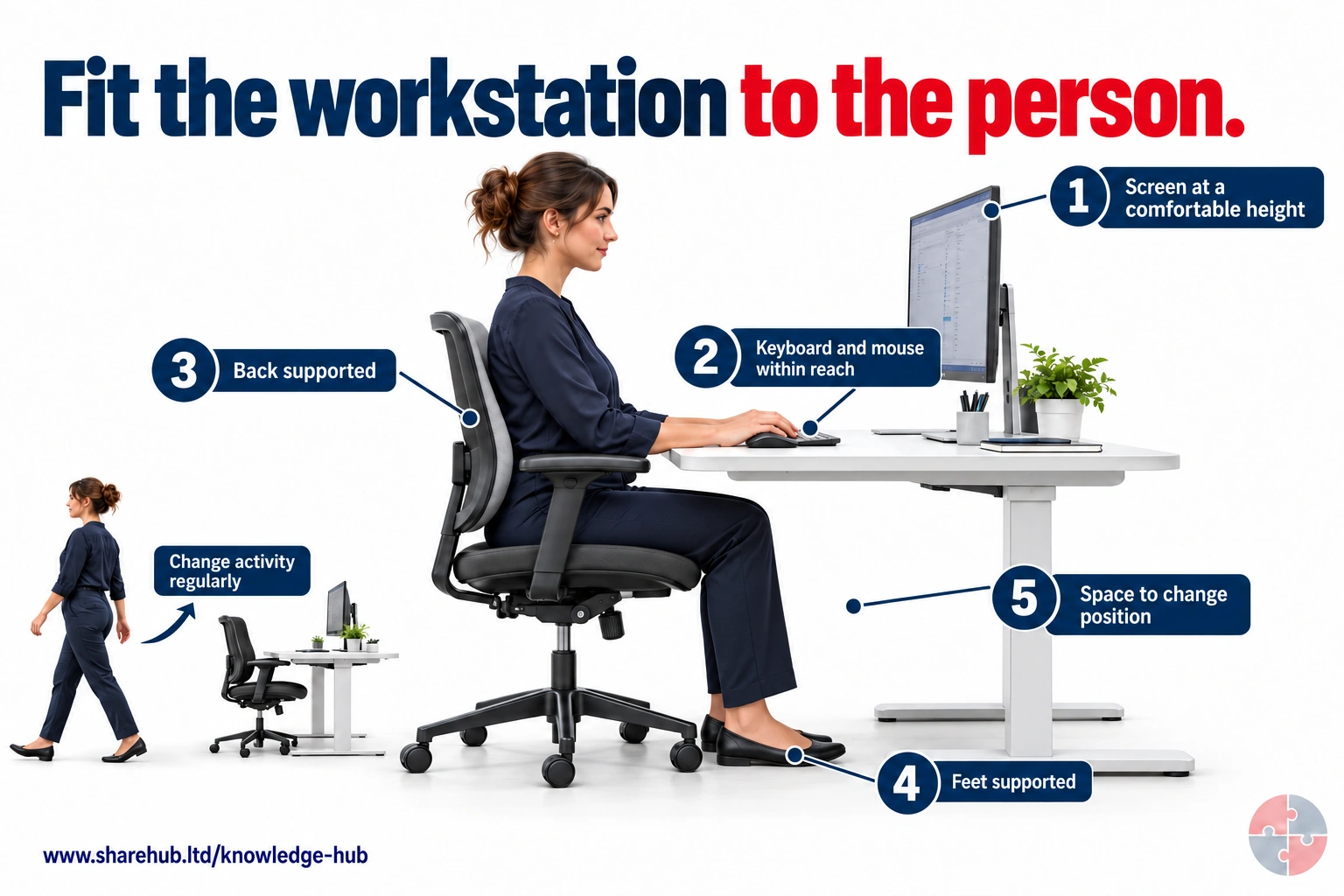

Adjust screen, input devices, chair and available space to the person and task. The feet rest on the floor and leg space remains clear. Vary activity and review comfort rather than treating a single posture as universally correct.
How should these adjustment points be used for an individual workstation?
Discuss the person and task, adjust the chair, screen and input devices together, support the feet where needed and keep room to move. Review comfort and vary activity.
An illustrative starting arrangement, not a fixed posture or dimensional standard. Use an individual DSE assessment and review the actual work.
Source guidance: HSE L26
A useful assessment starts with the user and the task. What equipment is used? How long are continuous screen periods? Is the person using a laptop, multiple screens or a phone? Is the mouse far away? Is the chair adjusted? Is glare present? Are meetings scheduled back-to-back? Does the worker have symptoms or adjustment needs?
Assessment software can help workers participate, but it is not the assessment by itself. A trained assessor should review unclear answers, provide feedback and ensure problems are corrected. Where discomfort persists or health factors are complex, competent ergonomic or occupational health advice may be needed.
| Assessment lens | Questions | Example control |
|---|---|---|
| Screen and input devices | Is the screen readable and are keyboard/mouse positions neutral? | Raise screen and provide separate keyboard/mouse for laptop work. |
| Chair and desk | Can the worker sit supported with feet and arms comfortable? | Adjust chair or provide footrest/alternative chair. |
| Reach and layout | Are frequently used items in easy reach? | Move phone, documents and controls into primary reach zone. |
| Work routine | Are there breaks or changes of activity? | Plan movement and non-screen tasks. |
| Environment | Is glare, noise, temperature or space affecting comfort? | Control glare, lighting, heating or noise source. |
| Individual needs | Are adjustments needed for health, disability or pregnancy? | Private review and competent advice where needed. |
What does good workstation support look like in hybrid work?
Good support checks both office and home work, then fixes the work routine as well as equipment.
A hybrid worker reports neck pain and headaches. The weak response is to send a generic posture leaflet. A stronger response reviews the home and office setups, finds laptop-only work at home, a low second screen in the office, back-to-back video calls, glare from a window and little task variation. Controls include a laptop stand, separate keyboard and mouse, screen adjustment, meeting breaks, glare control and a review date.
If symptoms persist, the manager should not diagnose. They should review work impact, adjust tasks where needed and signpost occupational health, general practitioner (GP), eyesight testing or ergonomics advice as appropriate.
Laptop-only work. Weak response: Accept because it is at home; Better response: Provide separate keyboard, mouse and stand where assessment needs it.
Back-to-back calls. Weak response: Treat as normal hybrid work; Better response: Build changes of activity into diary design.
Glare and headaches. Weak response: Tell worker to change brightness; Better response: Review lighting, screen position and eyesight route.
Neck discomfort. Weak response: Tell worker to sit straight; Better response: Adjust screen, chair, work height and routine.
Persistent symptoms. Weak response: Wait until absence occurs; Better response: Review task and signpost competent advice.
Record keeping. Weak response: Write medical assumptions; Better response: Record work actions and review date only.
How is workstation wellbeing different from formal DSE compliance?
Formal DSE duties already cover the whole workstation, job, individual needs, breaks, information and review. Workstation wellbeing supports their continued implementation and wider work-design needs over time.
Formal DSE assessment asks whether the workstation is assessed and risks are reduced. Workstation wellbeing checks whether those duties and wider work-design arrangements work across the normal week, including meetings, workload, interruptions, screen time, home working and changes in health; these existing DSE assessment needs are not optional extras.
The two should support each other. A wellbeing conversation may reveal that a DSE assessment needs updating; a DSE assessment may reveal work routine or workload issues that need manager action. DSE compliance is the control baseline; workstation wellbeing is the practical day-to-day test of whether that baseline is working for a real person doing real work.
| Topic | Formal DSE compliance focus | Workstation wellbeing focus |
|---|---|---|
| Assessment | A suitable and sufficient DSE assessment covers the workstation, user and task. | The assessment is tested against lived use, discomfort, fatigue, hybrid work and workload. |
| Posture and equipment | Chair, screen, keyboard, mouse, work surface, foot support and eyesight arrangements are considered. | The setup is comfortable, adjustable, understood and still suitable after changes. |
| Breaks and work routine | Breaks or changes of activity are planned into DSE work. | Meetings, calls, work pace and targets allow recovery in practice. |
| Training and information | Users know how to set up equipment and report problems. | Users feel confident to adjust, ask for help and raise early discomfort without blame. |
| Individual support | DSE actions are updated when discomfort, pregnancy, disability or other needs affect the setup. | Reasonable adjustments and support are discussed privately and reviewed. |
| Boundary | DSE compliance is not optional where the regulations apply. | Wellbeing support does not replace DSE assessment; it broadens the work-design conversation. |
Eye and eyesight decision. For an eligible display screen equipment user in GB or Northern Ireland, arrange and pay for an eye and eyesight test when requested. Fund special glasses only if the test shows they are needed solely for the DSE viewing distance; ordinary prescription glasses remain outside that special duty. The test route and any functional adjustment should be handled privately. See HSE eye-test guidance and HSENI DSE guidance.
What does workstation wellbeing look like in common setups?
Different workstation patterns create different comfort, workload and support issues.
A strong workstation wellbeing approach avoids assuming that one office checklist covers every working pattern. Fixed desks, hot-desks, laptop-only work, home working and call-centre environments all create different combinations of equipment, movement, workload, privacy, screen intensity and fatigue.
The practical question is not whether the person has a chair and a screen. It is whether the person can set up properly, vary the work, report discomfort, get problems fixed and work without avoidable pain, eye strain or fatigue.
Fixed office desk. Typical issue: Equipment is available but may drift out of adjustment over time; Practical support: Periodic self-checks, prompt action close-out, glare control and movement breaks.
Hot-desk area. Typical issue: Workers inherit poor settings or rush setup before meetings; Practical support: Adjustable equipment, clear setup prompts, enough space and easy reporting of faulty chairs/screens.
Laptop-only work. Typical issue: Neck flexion, raised shoulders, small screen and poor input-device position; Practical support: Laptop stand or dock, separate keyboard/mouse and limits on long laptop-only sessions.
Home-working setup. Typical issue: Kitchen table, sofa work, poor lighting, isolation or blurred breaks; Practical support: Home DSE review, suitable equipment where needed, diary boundaries and private support route.
Call-centre or helpdesk. Typical issue: High keyboard/mouse intensity, headset fit, emotional load and limited task variation; Practical support: Headset suitability, task rotation, recovery time, workload review and supervisor check-ins.
Hybrid worker. Typical issue: Different setups at home, site and office create repeated readjustment; Practical support: Consistent minimum equipment, travel-light alternatives, review after role or location changes.
What does workstation wellbeing look like in different roles?
The right support depends on work pattern, technology, environment and individual needs.
Workstation risk is not limited to traditional office roles. Reception workers may twist to screens while speaking to visitors. Control-room operators may sit for long periods. Laboratory staff may alternate screens and bench work. Remote workers may have poor equipment. Call-centre workers may experience high screen and emotional load.
Role-specific examples help managers avoid one-size-fits-all solutions.
| Role | Workstation issue | Control focus |
|---|---|---|
| Call centre | Continuous calls, screen time and headset use. | Work routine, headset fit, breaks and emotional load. |
| Control room | Long vigilance periods and multiple screens. | Console design, task rotation and fatigue controls. |
| Reception | Twisted posture between visitor and screen. | Screen/desk layout and seating position. |
| Remote worker | Laptop, kitchen table and blurred breaks. | DSE setup, equipment and boundaries. |
| Laboratory worker | Screen and bench task combination. | Bench height, reach and task variation. |
| Neurodiverse worker | Noise, light, interruptions or software load. | Individual adjustments and predictable workflow. |
When should workstation wellbeing escalate?
Escalate when discomfort persists, workstations cannot be adjusted locally, individual needs arise or work routine is causing unmanaged risk.
Escalation is not about making workstation issues medical too early. It is about getting the right help when normal adjustments do not work or when health, disability, pregnancy, eyesight, pain or complex ergonomics may need competent advice.
Managers should focus on work impact and support. They should not ask for unnecessary diagnosis details or keep informal medical notes.
Pain or discomfort reported. Immediate action: Review workstation and work routine; Evidence: Updated assessment and action.
Symptoms persist after adjustment. Immediate action: Seek ergonomic/occupational health (OH)/general practitioner (GP) signposting as appropriate; Evidence: Referral or advice route.
Home setup unsuitable. Immediate action: Review equipment and practicable controls; Evidence: Home DSE assessment.
Back-to-back screen work. Immediate action: Review meeting load and breaks; Evidence: Diary/workload action.
Individual adjustment need. Immediate action: Discuss privately and involve HR/OH if needed; Evidence: Adjustment plan and review date.
Multiple similar complaints. Immediate action: Review team work design; Evidence: Trend and manager action plan.
Where does workstation wellbeing fail?
It fails when organisations treat workstation health as a checklist instead of a living work-design issue.
Common failures include laptop-only work for long periods, assessments not updated after change, workers not knowing how to report discomfort, managers ignoring meeting overload, equipment delays, home work assumptions and treating discomfort as a personal posture problem.
Another failure is over-collection of health detail. A manager does not need a diagnosis to adjust a screen, provide a mouse or review meeting load.
Checklist-only approach. How it develops: Form completed but discomfort continues; What good looks like: Review real work and close actions.
Laptop default. How it develops: Long work done without separate input devices; What good looks like: Assess and provide suitable setup.
Breaks impossible. How it develops: Diary or workload prevents movement; What good looks like: Design breaks and task variation.
Home work ignored. How it develops: Home setup assumed acceptable; What good looks like: Assess home and office where relevant.
Symptoms normalised. How it develops: Aches accepted as part of desk work; What good looks like: Early reporting and review.
Intrusive records. How it develops: Manager records medical detail; What good looks like: Record work actions and support only.
What evidence shows workstation wellbeing is managed?
Evidence should show that assessments are current, actions are closed, work routines allow recovery and individual needs are supported.
Good evidence includes DSE assessments, action close-out, equipment provision, training, work routine review, eyesight-test arrangements where applicable, discomfort reporting, home/hybrid review, adjustment records and manager follow-up.
Evidence should be proportionate. A simple equipment adjustment may need a short action record. A complex case involving pain, disability or repeated symptoms may need OH, HR and ergonomic input.
DSE assessment. What it should show: Whole workstation, job and individual needs are reviewed; Assurance question: Is it current after change or discomfort?.
Action close-out. What it should show: Equipment and layout issues are fixed; Assurance question: Are actions completed promptly?.
Work routine review. What it should show: Breaks and activity changes are possible; Assurance question: Does the diary allow recovery?.
Training. What it should show: Workers know how to set up and report issues; Assurance question: Can they adjust equipment confidently?.
Home/hybrid review. What it should show: Both home and office arrangements are considered; Assurance question: Are assumptions tested?.
Adjustment record. What it should show: Support is private, necessary and reviewed; Assurance question: Is health data minimised?.
How should workstation wellbeing be assured?
Assurance should test whether people can actually work comfortably and sustainably, not just whether forms exist.
First-line assurance comes from worker self-checks, manager conversations and action close-out. Second-line assurance samples DSE assessments, unresolved actions, discomfort trends and home-working arrangements. Specialist assurance helps where cases are complex or symptoms persist.
A practical assurance question is: can a worker show how they adjust the workstation, take breaks or report discomfort without friction?
Worker. What to check: Setup, comfort, breaks and reporting route; What good looks like: Early concerns are raised.
Manager. What to check: Actions, meeting load, workload and adjustments; What good looks like: Issues are fixed and reviewed.
Employer’s health and safety lead / HR. What to check: Assessment quality, privacy and trend data; What good looks like: Support is consistent and lawful.
Specialist. What to check: Complex ergonomic, OH or accessibility cases; What good looks like: Advice becomes practical changes.
Leadership. What to check: Equipment delays and repeated issues; What good looks like: Resources remove recurring problems.
Which GB and NI duties apply to a workstation?
DSE duties depend on how the screen is used; general risk duties and manual-handling rules may also apply to the actual work. Use the relevant GB or Northern Ireland instrument rather than one generic UK citation.
HSE and HSENI both describe DSE users as workers using screens daily for continuous periods of an hour or more, including eligible home workers. For users, arrange and pay for an eye and eyesight test on request. Only special glasses needed solely for DSE viewing distance are employer-funded; ordinary prescriptions are not.
| Decision | Great Britain | Northern Ireland |
|---|---|---|
| General work risk | Health and Safety at Work etc. Act (HSWA) 1974 and Management Regulations 1999 See Health and Safety at Work etc. Act 1974; Management of Health and Safety at Work Regulations 1999. | HSW (NI) Order 1978 and Management Regulations (NI) 2000 See Health and Safety at Work (Northern Ireland) Order 1978; Management of Health and Safety at Work Regulations (Northern Ireland) 2000. |
| Regular DSE use | DSE Regulations 1992: daily continuous hour-or-more users; assess, reduce risks and fund requested eye tests and DSE-only special glasses See Health and Safety (Display Screen Equipment) Regulations 1992; HSE Eyes and eyesight testing. | DSE Regulations (NI) 1992: daily continuous hour-or-more users; assess and fund requested eye tests and DSE-only special glasses See Health and Safety (Display Screen Equipment) Regulations (Northern Ireland) 1992; HSENI Display Screen Equipment. |
| Loads or manual tasks | Manual Handling Operations Regulations 1992 where applicable See Manual Handling Operations Regulations 1992. | Manual Handling Operations Regulations (NI) 1992 where applicable See Manual Handling Operations Regulations (Northern Ireland) 1992. |
| Individual health details | United Kingdom General Data Protection Regulation (UK GDPR) and Data Protection Act 2018 as relevant See UK GDPR; Data Protection Act 2018. | United Kingdom General Data Protection Regulation (UK GDPR) and Data Protection Act 2018 as relevant See UK GDPR; Data Protection Act 2018. |
How should management arrangements be checked?
Assign responsibility, assess the actual risk, implement controls, monitor whether they work and review after change or failure.
HSE’s Plan, Do, Check, Act guidance supports management review. It does not replace topic-specific law, technical assessment or competent sign-off.
How do the controls change with the setting?
The same risk mechanism can appear in different tasks, but the route, equipment, people and competent owner change. Choose controls for the actual workplace and test them across shifts, contractors and non-routine work.
A generic checklist is a prompt, not evidence that the control works. Reassess after task, layout, vehicle, tool, staffing or work-pattern change.
| Setting | Credible risk | Specific control |
|---|---|---|
| Fixed office desk | Long DSE session and repeated input | Fit equipment, vary tasks and assess the actual user. |
| Home working | Kitchen table or limited space | Assess home setup and provide workable equipment. |
| Hot desking | Daily setup changes | Give a quick user check and a route for persistent problems. |
| Mobile or vehicle work | Laptop or tablet in constrained position | Limit duration, select suitable location and assess task demands. |
What must each role demonstrate?
Match information, practice, supervision and authorisation to the decision and consequence of error. Course attendance alone does not show that a worker can identify a stop condition or that a specialist can verify a safe state.
Observe actual tasks, use scenario questions, document limits of authority and reassess after a significant change or unsafe event.
| Role | Demonstrated decision | Reassessment trigger |
|---|---|---|
| Worker or DSE user | Set up available equipment, vary activity and report discomfort early. | New desk, home setup or symptom. |
| Line manager | Give time and equipment for action, check workload and follow up. | Unclosed action or recurrence. |
| Trained DSE assessor | Review whole workstation, task and individual need, not software score alone. | New user, changed setup or pain report. |
| Occupational health or ergonomics specialist | Advise when function, adjustment or complex exposure needs specialist input. | Persistent symptom or unclear safe capability. |
What training and competence are needed?
Competence is shown by a correct decision on the actual task, an observed check and a retained action record.
Choose the assessor for the consequence of error. Briefing attendance alone is not enough; review performance after change, a failed control or a worker concern.
DSE user. Set up the actual desk, vary screen work and report pain or visual difficulty early. Assessor and evidence: Trained assessor observes setup and checks the user can request help or an eye test. Recheck after: New desk, home setup or symptoms.
Trained assessor. Assess equipment, task, environment and individual need; close actions rather than accepting software output alone. Assessor and evidence: Ergonomics lead reviews an observed assessment, user feedback and action closure record. Recheck after: New equipment, task or recurring discomfort.
Line manager. Allow work variation and adjustments, protect private health details and check whether the change works. Assessor and evidence: Manager review records the action owner, date, worker feedback and any specialist referral. Recheck after: Unresolved symptom or work change.
Occupational-health or ergonomics specialist. Advise within clinical or ergonomic competence when functional needs are complex. Assessor and evidence: Clinical or technical lead reviews case rationale and scope of advice without unnecessary disclosure. Recheck after: Changed restriction or failed trial.
What does a practical example look like?

A hybrid DSE assessment should lead to equipment and work changes that are checked with the user.
Decision. A BuildOut Ltd designer works three days at home and two in the office and reports shoulder pain after long drawing sessions. The manager checks whether DSE user duties apply, arranges a trained assessment of both setups and asks about work impact without seeking a diagnosis.
Field check. The assessor observes screen height, input reach, work pace and variation. BuildOut supplies suitable input and display equipment, changes the drawing schedule to allow activity change and offers the DSE eye-test route on request. Persistent symptoms go to occupational health or a competent ergonomics specialist.
Evidence and review. The record names the user, assessment scope, agreed equipment and work changes, owner, completion date, confidential functional advice if any, and a review with worker feedback. The team rechecks after the home setup or task changes.
What do the acronyms and key terms mean?
Acronyms should be understood before they are used in assessments, briefings, audits or learning answers.
Acronyms can exclude newer readers if they are not explained. This section keeps the main terms available at the end of the page so the article stays readable while still supporting learners and audit users.
| Term | Meaning | Boundary |
|---|---|---|
| ACOP | Approved Code of Practice | Practical guidance with special legal status; following it is not compulsory, but it can be used as evidence of compliance. |
| ALARP | As Low As Reasonably Practicable | A risk reduction principle used especially in higher-hazard decisions. |
| HSE | Health and Safety Executive | Great Britain workplace health and safety regulator. |
| HSWA | Health and Safety at Work etc. Act 1974 | Great Britain Act; Northern Ireland uses the 1978 Order. |
| MHSWR | Management of Health and Safety at Work Regulations 1999 | Great Britain instrument; Northern Ireland has separate 2000 Regulations. |
| DSE | Display Screen Equipment | DSE is the display screen. The workstation also includes associated input devices, furniture, accessories and the immediate work environment; assess the whole assembly and task. |
| MSD | Musculoskeletal Disorder | Injury or disorder affecting muscles, joints, tendons, ligaments, nerves or related tissues. |
| OH | Occupational Health | Competent work-health advice route. |
| UK GDPR | UK General Data Protection Regulation | UK data protection law controlling personal data use, including health information. |
| MSK | Musculoskeletal. | A symptom pattern is not a diagnosis. |
| GP | General practitioner. | Use a clinical route for symptoms or diagnosis; managers address work impact. |
| ERICPD | Eliminate, Reduce including substitution, Isolate, Control, personal protective equipment, Discipline. | A SHARE decision prompt; sustain effective controls and learning. |
| PPE | Personal protective equipment. | It does not control ordinary workstation posture or repetition. |
| HSENI | Health and Safety Executive for Northern Ireland. | Use the NI regulator and separate NI legal instruments. |
| HR | Human resources. | Handles employer support and employment processes; clinical advice remains with competent health professionals. |
Unlock another resource
You have used this month’s two free downloads. Publish a post in your own words to unlock one more resource, or choose SHARE Individual for 10 downloads per month.
You decide whether to share. If you do, use the relevant platform disclosure tools and do not make claims you do not genuinely hold.