Explore normal function and possible harm; these are not diagnostic tools.
The Knowledge Hub total comes from the topic catalogue. Other scale figures were supplied by SHARE on 26 October 2026. These are not live counters. Categories may overlap and should not be added together. Access, downloads and reuse depend on membership allowances and the relevant licence. Repository files support research and are not a public download library.
How sources support a document
From relevant sources to competent review
01
Authoritative sources
Legislation, regulator guidance, relevant Approved Codes of Practice and recognised practice, including best available techniques where relevant.
02
Curated knowledge base
Selected research and relevant source passages provide a foundation.
03
Your task and workplace
Add the activity, people, location, actual controls and the information that is missing.
04
An editable draft
Prepare a useful first version with references where the tool supports them.
05
Competent review
Check accuracy and current requirements. Adapt, agree and authorise the content before use.
A guide to the process, not a technical architecture diagram. Sources have different legal status. Retrieval and generation depend on connected services; repository size is not the number of files retrieved for every document.
Start free. Find what helps your work.
Your account brings the available guidance, learning and tools together.
Free to join. No card needed. Paid is £17.99 per person per month excluding VAT; VAT is added at checkout. Business services are separate.
Explore the SHAREhub environment
The right support. For the work in front of you.
Understand the issue, prepare the work, build skills and check the result. Choose the support that fits your next workplace decision.
01
Get to the useful information sooner.
Explore the A–Z of safety, health and risk. Plain-English explanations, practical examples, control measures and links to source guidance help you understand an issue before you act.
What you can do
Research a hazard, responsibility or unfamiliar task.
Use topic images and interactive explanations to support a conversation.
Follow source links and check what applies to your workplace.
More time for: asking better questions and helping people understand why a control matters.
Find learning for your role and the risks you face. Browse free learning and specialist paid courses, then use your enrolled learning area to return to your courses and follow your progress.
What you can do
Refresh your understanding before a task or site visit.
Use detailed lessons, visual explainers and integrated 3D practice.
Return to your course overview and follow saved learning progress.
More time for: coaching, discussing decisions and applying what you have learned.
Start with an audit or inspection template and tailor the questions to the activity. Record what you observe, add evidence and turn findings into clear follow-up actions.
What you can do
Prepare focused checks against relevant topics and controls.
Add pen notes, photographs and image mark-ups to checklist entries.
Record what needs attention, who should act and what to revisit.
More time for: seeing the work, listening to workers and checking that improvements last.
Use focused calculators, assessments and planning records with information from the actual workplace. Keep the result, record the assumptions and turn the findings into practical action.
Find guidance for England, Northern Ireland, Scotland or Wales, then use fire assessment and record tools suited to the premises. Keep findings, supporting evidence and follow-up actions connected.
What you can do
Prepare a fire risk assessment and record significant findings.
Record alarm tests, fire door and extinguisher checks.
Capture drill learning and hot works fire-watch records.
More time for: inspecting the premises, checking arrangements and following up defects with the right people.
Each area has its own tools and access arrangements. Document allowances and learning access vary by plan; free members receive one trial report from each SHAREfire tool. SHAREintelligence generation depends on availability for your account. Review outputs against the actual work, discuss them with the team and make suitable amendments before use.
Built from over 8,500 files and researched topics, SHAREi connects detailed knowledge with practical tools.
3D model
Explore MEWPs in 3D
Rotate and zoom the mobile elevating work platform (MEWP) to see how the equipment, people and surroundings fit together. Step through the example to see what changes when a wheel drops into a recess or the platform approaches an overhead beam.
Create a free account to explore the other Knowledge Hub 3D explainers.
How SHAREhub uses 3D models
Explore a scene from different angles, follow numbered explanations and compare what changes when a safeguard is used or a fault is introduced. This helps you connect the guidance to what you can see and explain why the control matters.
Knowledge Hub. Follow how harm develops. In the local exhaust ventilation model, trace dust from its source and see what changes when the hood moves.
SHARElearn. Work through course scenarios, make decisions and use the feedback to check your understanding.
SHAREtools and inspection walkrounds. See where to look during a check, such as which parts of a workstation setup affect posture.
SHAREsim. Explore a whole workplace and see how tasks, people and vehicles interact, such as where their routes cross in a warehouse.
Use what you notice to explain a control to a colleague or identify what to check in your own workplace.
Go further with SHARElearn
See it. Question it. Put learning to work.
Use interactive environments to practise noticing hazards and weighing up decisions, then bring those questions back to the real workplace.
Explore 3D workplaces, inspect hazards and consider controls in different sectors. Use them for your own learning or as a starting point for team discussion.
Explore how qualification requirements, workplace evidence and assessor feedback fit together. The demonstration shows the assessment journey; enrolment and qualification services are separate.
Explore a 3D vehicle repair centre with eight mechanical bays, four accident repair bays, three paint booths and the outside road. Inspect the work, explore linked study guides and practise hazard management in the SHAREhub environment.
Follow fuel from pipeline receipt through storage and tanker loading to customer delivery. Inspect safeguards and practise PSM1 decisions in the SHAREhub environment.
youSHARE gives you topical courses to deliver to your own workforce whenever they need a useful safety conversation. Choose from 50 courses, prepare with facilitator notes and display a clean audience screen while keeping your notes on your own device.
Present in a room or share the audience window through your online meeting. The courses stay online, with no presentation-download option. Group learning stays separate from individual LMS grades, certificates and practical competence.
Select a role to see a practical way to use your account. These are examples to adapt to your work.
Safety professionals
Prepare with purpose. Spend more time on site.
Research a process in SHAREknowledge, prepare an assessment in SHAREintelligence and use SHAREtools to work through exposure or handling information. Take focused SHAREaudit questions into the workplace and use SHAREfire for premises-specific fire work.
Before the visit Find the relevant guidance and identify the questions to ask.
With the team Test your assumptions against the work as it happens.
Afterwards Refine the document, agree actions and revisit the controls.
The aim: less repetitive preparation, more observation and constructive challenge.
Turn a real task or recent finding into a short toolbox talk. Use SHAREtools for the task assessment and SHAREaudit for follow-up; bring fire defects and drill findings into SHAREfire where relevant.
Prepare Choose the topic and add the task, location and people involved.
Discuss Ask the team what makes the work difficult and agree practical controls.
Follow through Check that actions were completed and the controls actually help.
The aim: less time formatting briefings, more time coaching and listening.
Use clear topic guidance, visual explainers and practical learning to prepare for a task. Explore the questions in SHAREtools, then raise concerns or discuss improvements with your supervisor.
Understand Look up a hazard or unfamiliar safety term.
Explore Use a learning activity to question what could go wrong.
Speak up Discuss missing controls, concerns and improvements through your workplace arrangements.
The aim: more confidence to ask questions and contribute to safer work.
Build your understanding with SHAREknowledge and SHARElearn, practise decisions in SHAREsim and explore how SHAREtools turns workplace information into an assessment or plan.
Learn Use the Knowledge Hub alongside your course materials.
Practise Explore hazards and decisions in SHAREsim environments.
Develop Review your enrolled course progress and identify what to learn next.
The aim: less time searching for explanations, more time building understanding.
Combine source guidance, realistic visual explainers and structured documents with SHAREtools examples or SHAREfire records. Tailor the session to the sector, audience and activity you are supporting.
Research Check the source material and the limits of its application.
Tailor Adapt your briefing or inspection to the actual work.
Engage Use scenarios to invite challenge, discussion and feedback.
The aim: less repetitive preparation, more useful conversations and tailored support.
Use your personal account to understand workplace risks, explore learning and prepare questions for competent advisers. SHAREtools helps structure practical assessments; SHAREfire brings premises guidance and fire records into view.
Understand Read about your activities and the controls they need.
Prepare Create a structured brief for a discussion or workplace check.
Act Agree responsibilities and resources, then check progress.
Individual membership is personal access. Shared company records and team administration require a separate organisation service.
Move between all six areas, learning and account details. Keep course progress in your learning area and use each tool’s save or download controls to retain your work.
Your learningReturn to enrolled courses and view your learning records.
Your documents and working recordsUse the save and export options shown in each tool. Browser-saved worksheets and downloaded files do not automatically update organisation records.
Your membershipReview your plan, monthly allowances and upgrade options.
Your preferencesManage your profile and optional communication choices.
Choose the support that fits
Start free. Make room for more.
Start with free knowledge, selected learning, practical member tools and SHAREfire trial reports. Upgrade for larger document allowances and the learning access that suits your work.
Find your starting point
Free
£0 / month
For exploring the tools and occasional preparation.
Full Knowledge Hub topics after sign-in, with no reading cap
5 new library resources / month
1 AI risk assessment or bowtie draft / month
1 policy / month
1 toolbox talk / month
1 audit template / month
1 separate SHAREfire trial report per fire tool
20 AI questions or audit explanations / month
15 short eLearning courses, including DSE and workstation assessment
Complete 1 included course free per UK calendar month
For regular safety work, personal learning and workforce delivery with youSHARE.
Full Knowledge Hub topics after sign-in, with no reading cap
100 new library resources / month
20 shared assessment uses / month
10 policies / month
20 toolbox talks / month
10 audit templates / month
300 AI questions or audit explanations / month
100 included e-learning courses
Simulated learning environment courses
Learning based on NEBOSH criteria
Access to 3D environments for additional learning
Explore the simulated workplace businesses
youSHARE workforce presentation library
VAT is added at checkout once your address is entered. The 20 assessment uses are shared across AI risk assessment drafts, AI bowtie drafts and new completed SHAREfire reports. Business tools, specialist courses and qualifications are separately priced.
Each listed limit is an account-wide total for its category across the site. Policies, toolbox talks and audit templates each have their own monthly limit. AI questions and audit explanations share one question allowance. New library resources share one download allowance.
Free members get 1 AI risk assessment or bowtie draft per UTC calendar month. The separate SHAREfire trial gives 1 completed report per fire tool and does not reset monthly. Paid members share 20 uses per UTC calendar month across new AI risk assessment drafts, AI bowtie drafts and new completed SHAREfire reports.
You can download a document you already created again without using another allowance. Repeat library downloads and alternate formats of a resource you already selected also use no extra allowance. New library resources and AI questions reset by UK calendar month. Assessment, policy, toolbox talk and audit template allowances reset by UTC calendar month.
We created the SHAREhub environment to help eradicate life-changing injuries and fatal incidents. That is why we make practical guidance, selected learning and tools available for free.
Spend more time on site advising, coaching and understanding how work actually happens. Use what you learn to make better decisions and check that controls protect people.
Why we created SHAREhub · 38 seconds · HSE statistics published 19 November 2026Read the reel transcript +
We created SHAREhub to help eradicate life-changing injuries and fatal incidents at work. Free guidance, selected learning and practical tools help people prevent harm.
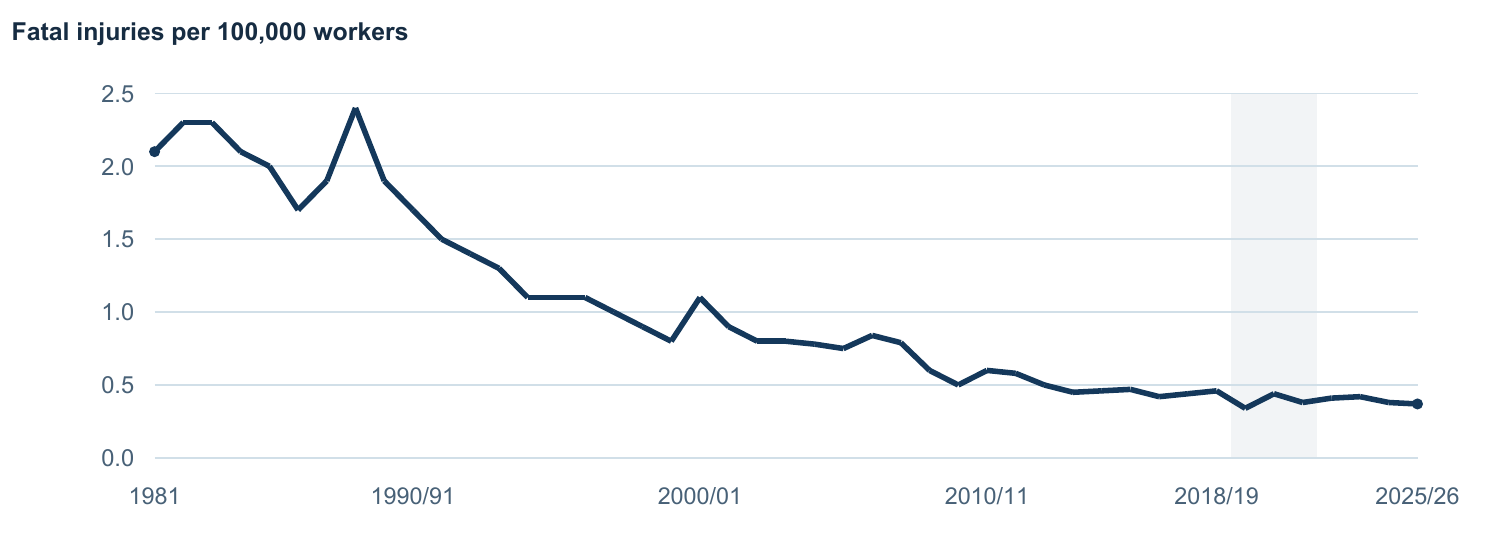
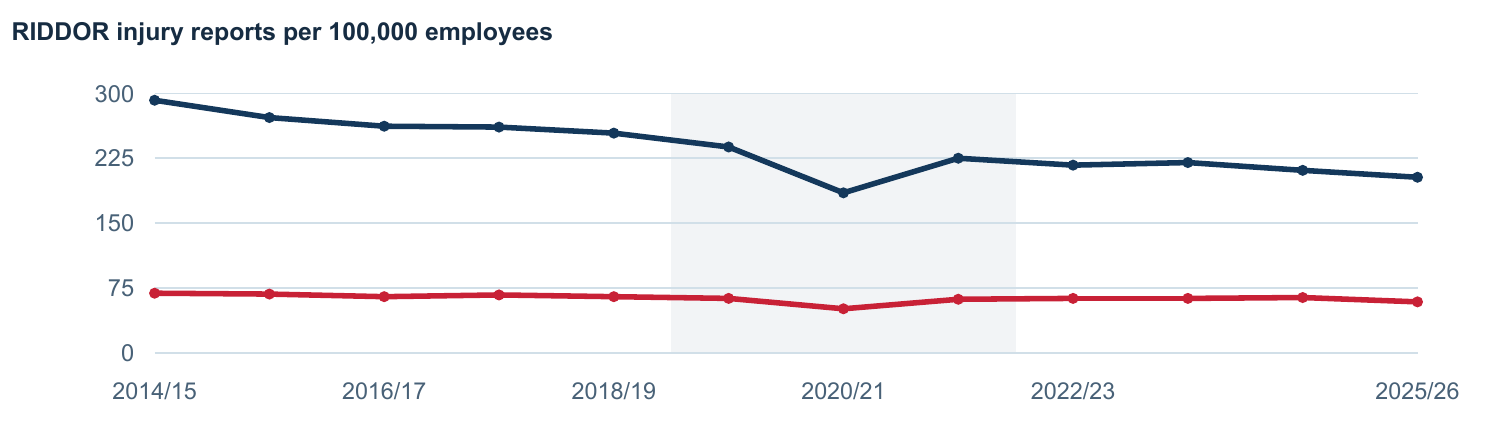
Great Britain recorded 126 worker deaths from work-related accidents in 2025/26, provisionally. The fatal injury rate has fallen over the long term and improvement has slowed.
The Labour Force Survey estimates 39.6 million working days lost in Great Britain in 2025/26. Work-related ill health accounts for about 88%.
Great Britain recorded 2,146 mesothelioma deaths in 2024. Deaths reflect past exposure and HSE projects a further decline.
Spend less time on administration and more time on site advising, coaching and understanding how work actually happens. Register for a free account or subscribe for higher usage limits.
Source: the HSE statistics release of 19 November 2026. The latest fatal injury year is 2025/26 and remains provisional.
Before you join
A few useful answers.
What can I do with a free account?
Read SHAREknowledge, explore free SHARElearn courses, use SHAREtools and the starter document allowances, and try one report from each SHAREfire tool. No card is needed to create a free account. Check each course or service for its access arrangements.
Why choose a paid individual plan?
A paid plan gives you larger monthly document and download allowances. Paid membership at £17.99 per person per month excluding VAT includes larger document allowances, the listed learning offer and youSHARE courses for you to deliver to your workforce. Qualification registration, external assessment and specialist services retain their separate arrangements.
How do I use SHAREintelligence responsibly?
Start with relevant source information and your actual task. Check suggested controls, responsibilities and assumptions with competent people, involve the team and follow your approval arrangements before use.
SHARE Intelligence
Grounded in research. Reviewed by people.
SHARE Intelligence connects the AI tools to SHARE's curated knowledge database, retrieving relevant research and guidance for your task rather than relying only on a model's general knowledge. The aim is to feed the tools with vetted and verified information, supported by identifiable sources, document versions and checks of relevance and currency.
Selected Knowledge Hub topics, research passages and your workplace brief give the tools a more specific evidence base. Your policies and procedures can add organisational context, but a policy requirement is not proof that a control is implemented. Source grounding helps reduce unsupported claims, errors and AI hallucinations; it cannot eliminate them. Check the cited material, current duties, assumptions and actual site conditions before relying on an output.
1. Retrieve relevant informationDescribe the task, select SHARE topics and hazards, and add the company information that applies. SHAREi retrieves relevant database passages to inform the document, with source references where supported by the tool.2. Create an editable documentBuild risk assessments, toolbox talks, policies or audit questions from the selected evidence and your brief. Treat suggested controls, responsibilities and actions as proposals to check, not statements that the work is safe or approved.3. Review, challenge and amendA competent reviewer checks accuracy, omissions, applicability, existing controls and further actions. Confirm owners, timescales and any scores, resolve missing information, and record the reviewed version before release.4. Share for further team reviewWhere organisational sharing is enabled, select team members or add reviewer email addresses. Otherwise, download the supported Word or PDF output and distribute it through your agreed process. Ask recipients to challenge assumptions, suggest changes and confirm what applies to their work.
Bring feedback back into the document, resolve outstanding actions and obtain the appropriate approval before use. Keep the current version, source references and review record together. Brief the team on the agreed output; an acknowledgement shows that someone has received or discussed it, not that the assessment is automatically correct or the work is authorised.
Live database retrieval, AI generation and in-system distribution depend on the relevant account, service and organisational connections being enabled. Preview examples and downloads do not by themselves demonstrate that these services are connected.
SHAREtools provides focused calculators, needs assessments and planning worksheets, including noise, HAVs, manual handling and training needs. SHAREfire brings country guidance, fire risk assessments, inspections, test logs and fire-watch records together. Follow the save and export options on each page; a worksheet does not automatically update a fire register or authorise work.
Free members receive one trial report from each of the six fire tools: fire risk assessment, fire alarm test log, fire door inspection, fire drill record, extinguisher inspection and hot works fire watch. You can reopen or download the same completed report again. Each tool has its own one-off trial. It does not use your monthly risk or bowtie allowance and does not reset monthly.
Does my subscription include qualifications or company-wide access?
Free and Paid memberships are for personal use; business tools are not included. Specialist courses, qualifications, assessor services and organisation accounts have separate enrolment or access arrangements. Exploring an interactive environment does not award a qualification or authorise a task.
How does the wider organisation system fit together?
The wider SHAREhub environment connects organisational risks, documents, incidents, competence, health, fire records and actions where the organisation service is enabled. These are separate from an individual subscription.
The individual account is the starting point. Separate organisation services connect knowledge, risks, audits, learning and fire safety evidence where enabled.
RR
Risk Register and Risk Assessment
Create, score and review risks using consistent likelihood, severity, controls, owners, evidence and review dates. Topic guidance can feed risk assessment documents, and completed risk work can be saved back into the organisation workspace.
Manage policies, procedures, forms, standards and acknowledgements as controlled records. The management system is designed to show what has been approved, who has accepted it, what is due for review and which risks or audits rely on it.
Capture incidents, near misses, unsafe conditions and positive observations. The aim is to connect events to lessons learned, corrective actions, risk reviews, briefings and management visibility.
Define roles, required capabilities, evidence, assessments and renewal cycles. Competence records help show who is suitable for safety-critical tasks and where gaps need action.
Connect health surveillance, wellbeing support and employer-facing fitness outcomes without exposing unnecessary confidential clinical detail. The module separates operational control from sensitive health records.
Manage fire risk assessments, fire door inspections, extinguisher checksheets, alarm tests, emergency lighting, fire drills, hot works fire watch records, actions and report outputs in one fire workspace.